
Robotics with Python
Robotics: integrating basic disciplines to create fascinating machines that can gradually learn to imitate ethics, human behavior and qualities. The field of robotics amazes and intrigues people of all ages around the world. This article picks up where the previous article left off.
Robots can learn, navigate and make decisions for themselves. This article will give you more experience with Robotics With Python. It will explain more concepts that are directly related to Robots and the field of Robotics. I will also show you and explain the Python code that I have coded (Source: My PC) for a Robot. Now, let's go straight to that!
Source: CIO.com
Important robot components
A well-built robot will possess the ability to learn, navigate and make decisions autonomously and you will effectively and efficiently make a rational and logical decision in the event of an unforeseen change in your immediate environment. The element that allows a robot to become a physical part.
of its environment are the components that are on board; Specifically, the Sensors. Sensors are crucial in a robotic system as they reduce the
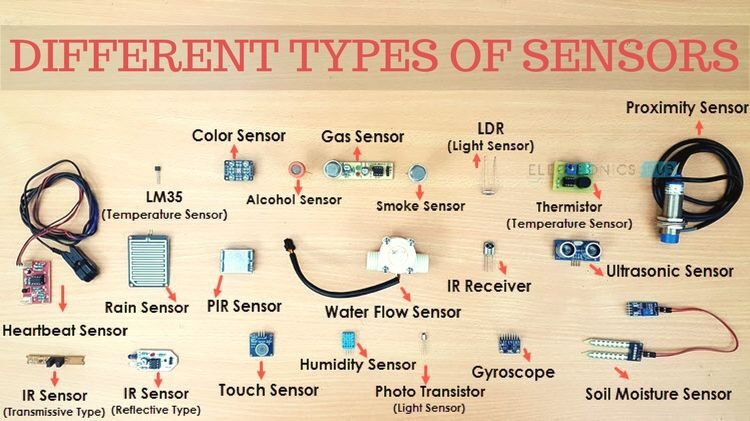
need for interaction, thus increasing the levels of autonomy in a system. A list of sensors that are available in the market is as follows (it's good
know that the list is not limited to these):
- – Light sensors.
- – Thermometers.
- – Pressure sensors.
- – Position sensors.
- – Sensores Hall.
- – Flex Sensors.
- – Sound sensors.
- – Ultrasonic sensors.
- – Touch sensors.
- – PIR sensors.
- – Tilt sensors.
- – Gas sensors.
These are some examples of sensors that can be bought in electrical stores. If you look closely, you will notice that each of these sensors can detect a specific stimulus in the immediate or distant environment. And you will realize that if they are integrated into a single system, these components will allow any object to respond to any stimulus as a human being can.
The sensor module will detect an input from a source and respond with a certain output. In general, a sensor will convert any non-electrical physical or chemical quantity into electrical signals. The input of a sensor must be maintained for you to have a consistent output. For instance, a motion sensor will not emit a red light if there is no object moving nearby. There are three specific sensors that we will discuss: Light, Sound and Ultrasonic.
Light sensors
This sensor converts the frequency of light into electrical signals, namely, the output of these sensor signals. The signal tells us the intensity of the light that is detected. It works by measuring the electromagnetic waves that exist at all frequencies of light (infrared, visible, ultraviolet).
Sound sensors
This sensor detects and converts sound waves into electrical signals. The microphone diaphragm must be in working order. This is because
Sound waves traveling through the air hit the diaphragm, causing it to vibrate and change capacitor readings. Capacitor readings are converted to digital signals that can be used for processing purposes.
Ultrasonic sensors:
This sensor will convert the reflected sound waves into electrical sensors. Ultrasonic sensors have the ability to measure the distance between objects. The ultrasonic sensor has a built-in transmitter and receiver. The transmitter will send out a sound wave in the form of piezoelectric signals and the receiver will read the sound waves after the reflection process has occurred..
These small but powerful devices are used in everyday life and will grant you access to high-end calculations on your computer when you bring them into the light of robotics.. For instance, the world-renowned automotive company: Tesla Incorporated. Tesla vehicles use numerous sensors that are mounted around the car.
The Tesla vehicle makes use of ultrasonic sensors to assist with wheel alignment and road centering, together with LIDAR (light detection and range) for object detection, sound sensors to detect objects in the vicinity of the vehicle, cameras for computer vision, machine learning, and other advanced technology. All these sensors are responsible for creating the autonomous vehicle that we see on the roads.
Source: Electronics hub
Engines
A common motor to use when experimenting with robotics with Python is the DC motor. DC means direct current. DC motors most likely have wheels attached to the output end, namely, the mechanical energy that is emitted will be used to turn the wheels. A DC motor A is an electrical component that requires an electrical current input and provides an output of mechanical energy or motion.. Components within the DC motor include the coil winding, The magnets, the rotors, the brushes, stator and current source.
The idea this works on is that when the coil is powered, namely, a current is passed through it, a magnetic field is generated around the coil, what makes the coil interact with the magnets, which causes the coil to rotate and finally produce mechanical energy.
Power switch
A robot will need a power switch to turn it on and off. The power switch serves as a power switch for the robot, allowing current to stop flowing in circuits and allowing components to cool. When the switch is on, current flows in the circuit and when it is off, current flow stops.
Push button switch
This is a simple device that can allow or prevent the control of a specific machine or process. A push button switch is built with electrical circuits that allow current to pass through it. Altering the flow of this current is what triggers events in our circuit.
Pushbutton switches can be used for normally on or normally off circuits. In a normally lit circuit, currently flows through the circuit and, by pressing the button, current flow is interrupted. In a normally off circuit, no connection or flow of electricity until button is pressed.
Transistor
A transistor is a semiconductor that has two functions. It can act as a switch or as a current amplifier. A transistor by nature has two wires (the paws, tiny metal rods to connect the wires). As a switch, the transistor will reduce the current on one side of the wires and increase the current on the other side. As an amplifier, the transistor will accept current in one wire and output it from the other at a higher current.
Resistor
This is one of the most popular and widely used electronic components. It has two terminals (cables / legs) and integrating this into your electrical circuit will implement resistance in your circuit. Resistor can be used to reduce current flow, divide the voltage and adjust the electrical signal levels.
Control robot components with Python.
Push button switch control.
# we begin by importing the necessary package
import RPi.GPIO as GPIO

# we configure our system to temporarily ignore all warnings
GPIO.setwarnings(False)

# we set our system to use the physical pin numbering
# on the Raspberry Pi
GPIO.setmode(GPIO.BOARD)

# we configure The GPIO pin number 10 on our Raspberry Pi to be
# an input pin and we set the initial state of the pin to be
# pulled low "PUD_DOWN". This means that the button is in
# an "OFF" state
GPIO.setup(10, GPIO.IN, pull_up_down=GPIO.PUD_DOWN)

# we set up a While loop that is going to run forever
# the While loop is going to constantly check the state of
# our Push Button Switch. In the event of our button
# being pressed, there are words that will be printed
# to the console
while True:

# we check if the GPIO pin number 10 is pushed
# we check the current running throught the button
# if the current is high
if GPIO.input(10) == GPIO.HIGH:

# we print the following words
print("Button was pushed!")
Control of DC motors
# we begin by importing the necessary packages
import time
from easygopigo3 import EasyGoPiGo3

# we create an instance of the Robot that we are using
# If you wish to indulge in the field of Robotics
# navigate to a web browser and search "What is GoPiGo3"
# it is interesting :) - you may be persuaded to purchase a unit for yourself
gpg = EasyGoPiGo3()

# we configure the motors to move forward for two seconds
gpg.forward()
time.sleep(2)

# we stop all motor movement for one second
gpg.stop()
time.sleep(1)

# we drive all motors 50cm forward
gpg.drive_cm(50, True)
time.sleep(1)

# we turn the motors to the left
gpg.left()
time.sleep(1)

# we turn the motors to the right
gpg.right()
time.sleep(1)

# we stop all robot activity
gpg.stop()

# we print a final message telling us if the script
# was successful
print("Movement Successful!")
The ultrasonic sensor
You may be wondering how to use the ultrasonic sensor for a robot. Now, the ultrasonic sensor is used to create a LIDAR-based map of the area where the robot currently resides. The ultrasonic sensor is used in combination with a servo (motor) allowing the ultrasonic sensor to rotate, allowing the robot “see” more of its surroundings. I will not provide the complete code, as it is extensive and requires understanding. I will provide a truncated image of the code found on my PC.
To give a brief explanation of the functions of this map is as follows; will allow our robot to digitally see the environment it is in. The ultrasonic sensor, as we know it, has the ability to measure distance, and when combined with cameras (computer vision) and the real-time map that is generated, we can effectively identify objects and navigate around them.
At the end of the code, there is a “if statement” which does the final check to see if an object is within the specified distance from the robot, for instance, 10 cm.
I hope this article has provided you with more information about Robotics with Python. If you are a person who likes to play with Python and information technology or robotics in general, I recommend that you buy one or two sensors and a "breadboard". These are components that can be bought at reasonable prices on the market and will definitely keep you intrigued..
Thanks for your time.
The media shown in this article: Robotics With Python are not the property of DataPeaker and are used at the author's discretion.





