
This article was published as part of the Data Science Blogathon
The machines that understand language fascinate me, and I often ponder what algorithms Aristotle would have gotten used to building a rhetorical analysis machine if he had had the chance. If you are new to data science, getting into NLP can seem complicated, especially since there are many recent advances in the field. it's hard to understand where to start.
Table of Contents
1. What can machines understand?
2.Project 1: Word cloud
3.Project 2: Spam detection
4.Project 3: Sentiment analysis
5. Conclution
What can machines understand?
While a computer can be quite good at finding patterns and summarizing documents, must transform words into numbers before making sense of them. This transformation is very necessary because mathematics does not work very well with words and machines. “they learn” thanks to math. Before the transformation of words into numbers, data cleaning is required. Data cleansing includes removing punctuation and special characters and modifying them in ways that make them more consistent and interpretable.
Project 1: Word cloud
1.Dependencies and data import
Start by importing the dependencies and data. The data is stored as a comma separated values file (CSV), so i will use pandas ‘ read_csv () function to open it in a DataFrame.
import pandas as pd
import sqlite3
import regex as re
import matplotlib.pyplot as plt
from wordcloud import WordCloud
#create dataframe from csv
df = pd.read_csv('emails.csv')
df.head()
df.head()

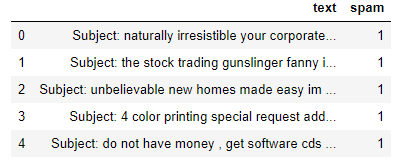
2.Exploratory analysis
To remove duplicate rows and set some baseline counts, it is better to do a quick analysis of the data. Here we use pandas drop_duplicates to remove duplicate rows.
print("spam count: " +str(len(df.loc[df.spam==1])))
print("not spam count: " +str(len(df.loc[df.spam==0])))
print(df.shape)
df['spam'] = df['spam'].astype(int)
df = df.drop_duplicates()
df = df.reset_index(inplace = False)[['text','spam']]
print(df.shape)
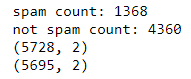
Counts and shape before / after deduplication
What is a word cloud?
Word clouds make it easy to understand the frequencies of words, so it is a useful way to visualize text data. The words that appear the largest in the cloud are the ones that appear most frequently in the text of the email. Word clouds make it easy to identify “keywords”.
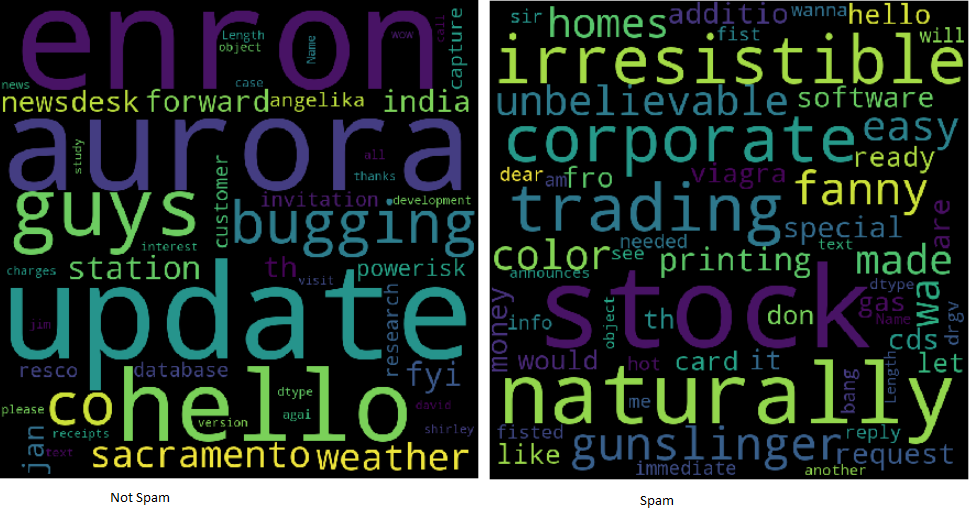
Word cloud examples
All text is lowercase in word cloud image. Contains no punctuation or special characters. The text is now called clean and ready for analysis. With the help of regular expressions, it's easy to clean the text using a loop:
clean_desc = []
for w in range(len(df.text)):
   desc = df['text'][w].lower()
   #remove punctuation
   desc = re.sub('[^ a-zA-Z]', ' ', desc)
   #remove tags
   desc=re.sub("</?.*?>"," <> ",desc)
   #remove digits and special chars
   desc=re.sub("(d|W)+"," ",desc)
   clean_desc.append(desc)
#assign the cleaned descriptions to the data frame
df['text'] = clean_desc
df.head(3)
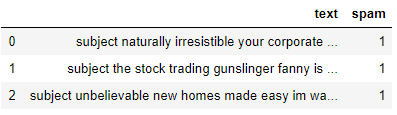
Notice here we create an empty list clean_desc, then we use a in loop to check the text line by line, setting it to lowercase, removing punctuation and special characters and adding it to the list. Then we replace the text column with the data in the clean_desc list.
For words
Stopwords are the most common words like “the” Y “of”. Removing them from the email text allows the most relevant frequent words to be squared. Eliminating stop words can be a common technique!! Some Python libraries like NLTK come preloaded with a stopword list, but it's easy to form one from scratch.
stop_words = ['is','you','your','and', 'the', 'to', 'from', 'or', 'I', 'for', 'do', 'get', 'not', 'here', 'in', 'im', 'have', 'on', 're', 'new', 'subject']
Please note that I include some email related words, What “re” Y “affair”. It is up to the analyst to see what words should be included or excluded. Sometimes it is beneficial to incorporate all the words!
Build the word could
Conveniently, there is a python library to create word clouds. It will be installed using pip.
pip install wordcloud
When building the word cloud, es posible alinear varios parametersThe "parameters" are variables or criteria that are used to define, measure or evaluate a phenomenon or system. In various fields such as statistics, Computer Science and Scientific Research, Parameters are critical to establishing norms and standards that guide data analysis and interpretation. Their proper selection and handling are crucial to obtain accurate and relevant results in any study or project.... como alto y ancho, empty words and maximum words. it's even possible to shape it instead of showing the default rectangle.
wordcloud = WordCloud(width = 800, height = 800, background_color="black", stopwords = stop_words, max_words = 1000
                     , min_font_size = 20).generate(str(df1['text']))
#plot the word cloud
fig = plt.figure(figsize = (8,8), facecolor = None)
plt.imshow(wordcloud)
plt.axis('off')
plt.show()
To save and display the word cloud. Matplotlib and show are used (). Regardless of whether it is spam, is the result of all records.
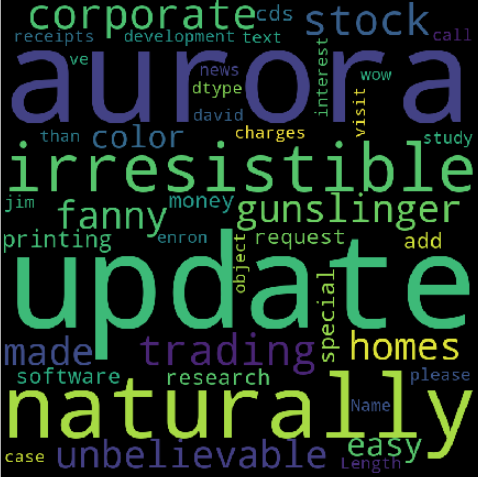
Push the exercise even further by splitting the information frame and creating two-word clouds to help analyze the difference between the keywords used in spam and not spam..
Project 2: Spam detection
Think of it as a binary classification problem, since an email can be spam indicated by “1” o in spam indicated by “0”. I would like to create a machine learning model that can identify whether an email can be spam or not. I am visiting the Python Scikit-Learn library use to explore the tokenization algorithms, vectorization and statistical classification.

Import dependencies
Import the functionality of Scikit-Learn that we would like to modify and model the information. I will use CountVectorizer, train_test_split, ensemble models and a couple of metrics.
from sklearn.feature_extraction.text import CountVectorizer
from sklearn.model_selection import train_test_split
from sklearn import ensemble
from sklearn.metrics import classification_report, accuracy_score
Transform text into numbers
In the project 1, the text was cleaned. once you take a look at a word cloud, note that these are mostly single words. The bigger the word, the higher its frequency. To prevent the word cloud from generating sentences, the text goes through a process called tokenization. is the method of dividing a sentence into individual words. Individual words are called tokens.
With CountVectorizer () de SciKit-Learn, it is easy to rework the body of text into a sparse matrix of numbers that the computer can pass to machine learning algorithms. To simplify the concept of counting vectorization, imagine you have two sentences:
The dog is white
The cat is black
Converting the sentences to a vector space model would transform them in such a way that it looks at the words in all the sentences and then represents the words in the sentence with a number.
The cat dog is white black
The dog is white = [1,1,0,1,1,0]
The cat is black = [1,0,1,1,0,1]
We can show this using code as well. I’ll add a third sentence to show that it counts the tokens.
#list of sentences
text = ["the dog is white", "the cat is black", "the cat and the dog are friends"]
#instantiate the class
cv = CountVectorizer()
#tokenize and build vocab
cv.fit(text)
print(cv.vocabulary_)
#transform the text
vector = cv.transform(text)
print(vector.toarray())

The sparse matrix of word counts.
Notice that within the last vector, you will see a 2 since the word “the” appears twice. CountVectorizer counts the tokens and allows me to construct the sparse array containing the words transformed into numbers.
Word bag method
Because the model does not take into account the location of the words and, instead, He mixes them up like chips in a scrabble game, this is often called the bag of words method. I am visiting to create the sparse matrix, then split the information using SK-learn train_test_split ().
text_vec = CountVectorizer().fit_transform(df['text'])
X_train, X_test, y_train, y_test = train_test_split(text_vec, df['spam'], test_size = 0.45, random_state = 42, shuffle = True)
Notice I set the sparse array text_vec to X and the df[‘spam’] column to Y. I shuffle and take a test size of the 45%.
The classifier
It is highly recommended to experiment with multiple classifiers and determine which one works best for this scenario.. during this example, I am using GradientBoostingClassifier model () from the Scikit-Learn Ensemble collection.
classifier = ensemble.GradientBoostingClassifier(
   n_estimators = 100, #how many decision trees to build
   learning_rate = 0.5, #learning rate
   max_depth = 6
)
Each algorithm will have its own set of parameters that you can modify. that's called hyperparameter tuning. submit to the documentation to learn more about each of the parameters used in the models.
Generate predictions
Finally, we adjust the information, we call predict and generate the classification report. When using classification_report (), easy to create a text report showing most ranking metrics.
classifier.fit(X_train, y_train)
predictions = classifier.predict(X_test)
print(classification_report(y_test, predictions))
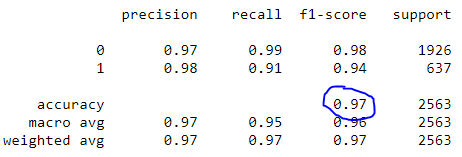
Classification report
Note that our model achieved an accuracy of the 97%.
Project 3: Sentiment analysis
Sentiment analysis is, what's more, sort of a classification problem. The text is basically visiting to reflect a positive sentiment, neutral or negative. that is noticeable due to the polarity of the text. It is also possible to determine and account for the subjectivity of the text! There are many great resources covering the speculation behind sentiment analysis..
Instead of building another model, this project uses a simple, out-of-the-box tool to investigate sentiment called TextBlob. I will use TextBlob to present opinion columns in the DataFrame so they are parsed often.

What is TextBlob?
Built on NLTK and pattern, the TextBlob library for Python 2 and three attempts to simplify various word processing tasks. Provides tools for classification, tagging part of speech, phrase extraction, sentiment analysis and more. Install it using pip.
pip install -U textblob
python -m textblob.download_corpora
Sentiment by TextBlob
Using the sentiment property, TextBlob returns a named tuple of the form Sentiment (polarity, subjectivity). Polarity can float within range [-1.0, 1.0] where -1 is the most negative and 1 is the most positive. Subjectivity could float within range [0.0, 1.0] where 0.0 is extremely objective and 1.0 it is extremely subjective.
blob = TextBlob("This is a good example of a TextBlob")
print(blob)blob.sentiment
#Sentiment(polarity=0.7, subjectivity=0.6000000000000001)
Apply TextBlob
When using comprehension lists, it's easy to load the text column as TextBlob, so create two new columns to store polarity and subjectivity.
#load the descriptions into textblob
email_blob = [TextBlob(text) for text in df['text']]
#add the sentiment metrics to the dataframe
df['tb_Pol'] = [b.sentiment.polarity for b in email_blob]
df['tb_Subj'] = [b.sentiment.subjectivity for b in email_blob]
#show dataframe
df.head(3)

TextBlob makes it very simple to arrive at a baseline sentiment score for polarity and subjectivity. To boost this user even further, see if you can add these new features to the spam detection model to increase accuracy.
Conclution:
Although linguistic communication processing can seem like an intimidating topic, the fundamental pieces do not seem to be that difficult to understand. Many libraries make it easy to start exploring data science and NLP. Completing these three projects:
Word cloud
Spam detection
Sentiment analysis
The media shown in this article is not the property of DataPeaker and is used at the author's discretion.





