

Synthetic key
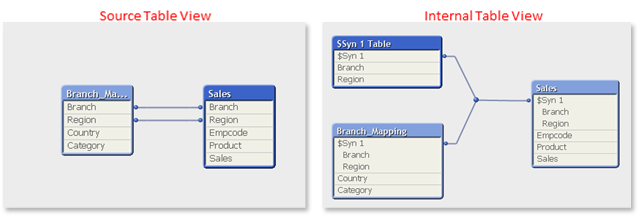
Before talking about synthetic keys, let's look at a typical QV data model (in the diagram on the right). Here, we can see three tables "Sales", “Branch Assignment” and “$ Syn 1 ″. But, I had only loaded two tables (Sales y Branch Mapping) in QlikView. Another surprise appears when I look closely at the tables of “Sales” Y “Branch mapping”. There is a variableIn statistics and mathematics, a "variable" is a symbol that represents a value that can change or vary. There are different types of variables, and qualitative, that describe non-numerical characteristics, and quantitative, representing numerical quantities. Variables are fundamental in experiments and studies, since they allow the analysis of relationships and patterns between different elements, facilitating the understanding of complex phenomena.... additional “$ Syn 1” in both tables.
When I first encountered this effect in the data model, I couldn't identify why this was happening. Until a certain point, this didn't bother me due to the dash output working fine. But, when my mentor looked at this model, i knew that “$ Syn 1” is a synthetic key and “$ Syn 1 Table” it is a synthetic board.
What are synthetic keys or tables?
When we load two tables with a common field name in both tables, tables are automatically associated based on common fields. This is the associative functionality of QlikView.
Despite this, when we have more than one common field between two or more tables, QlikView creates "SYNTHETIC KEYS" and "SYNTHETIC TABLE". QlikView adds a synthetic table (as table $ Syn) and a synthetic key (As a symbol $ Syn) to the data model. Keys are added to user-loaded tables and used to join them with the synthetic table.
The synthetic key is QlikView's method of dealing with composite keys. The synthetic table contains a synthetic key that is a composite of all combinations of the multiple key fields that connect the tables. In our data model, we had two common fields, “Rama” Y “Region”, so QlikView created the synthetic key and synthetic table on its own. If we look at the source table view of the table viewer, shows that two fields are connected between these two tables.
Are synthetic keys good or bad?
According to the QlikView reference manual:
When the number of composite keys increases / synthetic, depending on the amount of data, the structure of the table and other factors, QlikView may or may not handle them correctly. QlikView may end up using an excessive amount of time and / or memory. Unfortunately, actual limitations are virtually impossible to predict, which leaves only trial and error as a practical method to determine them.
- This is one of the reasons why many people delete synthetic keys. But this statement is applicable when you have multiple synthetic keys in your data model. Despite this, if your data model has multiple synthetic keys, there is likely a serious bottleneck with your data model and not with synthetic keys.
- When you have two or more tables and they have multiple common fields, synthetic keys create correct solution, compact and efficient. Synthetic keys are not the reason for performance and memory issues. As usual, they work a little better or similar, compared to manual composite keys, which are generally used to delete synthetic keys.
- In one of the instances, I remembered that one of my colleagues mentioned that because of the synthetic key, the data model output is not displaying correctly or there is a performance hurdle, but when you have removed the synthetic keys, it is working well. Here the real problem was not the synthetic keys, it was a poor data model and, when deleting synthetic keys, it has improved. At this time I do not have performance and memory comparison details for with or without synthetic keys (if you have, please share).
Why should we delete synthetic keys?
As mentioned previously, synthetic keys can be created due to poor data modeling. Whenever a unexpected synthetic key it is created, we should look at the data model again, make the necessary changes and, due, we end up with a good data model. Note that the important keyword in the last statement is UNEXPECTED. Opposite case, synthetic keys do no harm.
The second reason, what I realized over time is that every time I create my own composite keys instead of synthetic keys, I have much more clarity about the data model.
Opposite case, I can say that synthetic keys are good and provide ease to handle composite keys if you are working on a good data model.
How to delete synthetic keys?
To delete synthetic keys, we first look at our data model and make the necessary changes, if required. We have several methods to delete synthetic keys, but it depends on the requirement.
- Removing fields: When the common fields that generate synthetic keys are not needed in the data model and doing so will not affect the linking between two tables. Field removal can be done by commenting out or removing the field from the load script.

- Rename fields (using RATE): When the common fields that generate synthetic keys are not the same field (do not contain similar values), these are actually different fields with the same name. The name change can be done through the clause “AS”. We can also achieve this through the use of the RATE statement.. With a qualified statement, the field names are converted to the format “TableName.FieldName”
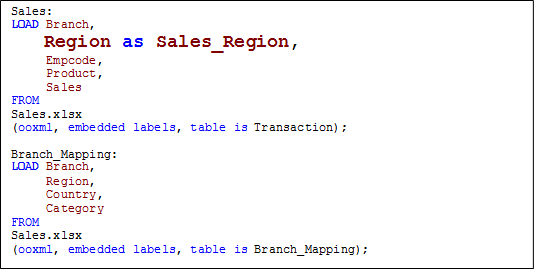 Using QUALIFY
- Auto number keys / compound: When we know that the common fields that generate synthetic keys are important to the data model, we can create our own key to handle composite keys. We can also use the Autonumber functions / Autonumberhash128 / Autonumberhash256 to create composite keys. These will create a unique bit value for each distinct combination of the concatenated columns. Autonumberhash128 and Autonumberhash256 create values of 128 bits y 256 bits respectively. Note that Autonumber can be problematic in applications that generate QVD files for use in other QlikView applications..

- We also have other methods to delete synthetic keys such as “Create a link table“,”Create explicit joins ” Y “Concatenate similar tables“. These topics need to be discussed in detail and we will explore them in the future..
Final note:
In general, developers want to delete synthetic keys because they are believed to have a negative impact on performance and memory utilization. Despite this, That is not true. They handle composite keys in a more efficient way compared to manual keys, if we have a good data model. If you have experienced the difference in performance and memory utilization with or without synthetics, share your thoughts in the comments below, since it will benefit the community.





