
Overview
- We understand Python Operator in Apache Airflow with an example
- We will also discuss the concept of Variables in Apache Airflow
Introduction
Apache Airflow is a must-have tool for data engineers. Makes it easy to create and track all your workflows. When you have multiple workflows, there are more chances that you are using the same databases and the same file paths for multiple workflows. The use of variables is one of the most efficient ways to define such information shared between different workflows..
We will cover the concept of variables in this article and an example of a Python operator in Apache Airflow.
This article is a continuation of Data Engineering 101: Introduction to Apache Airflow, where we cover the features and components of airflow databases, the installation steps and create a basic DAG. Then, if you are a complete beginner in Apache Airflow, I would recommend that you read that article first.
Table of Contents
- What is Apache Airflow?
- Start the air flow
- Python operator in Apache Airflow
- What are the variables in Apache Airflow?
What is Apache Airflow?
Apache airflow is a workflow engine that will easily schedule and run your complex data pipelines. It will ensure that each task in your data pipeline runs in the correct order and that each task gets the necessary resources.
It will provide you an amazing user interface to monitor and fix any issues that may arise.

Start the air flow
We have already discussed the installation steps in the previous article in this series..
To start the airflow server, open terminal and run the following command. The default port is 8080 and if you are using that port for something else, can change it.
airflow webserver -p 8080
Now, start the airflow scheduler using the following command in a different terminal. It will monitor all your workflows and activate them as assigned.
airflow scheduler
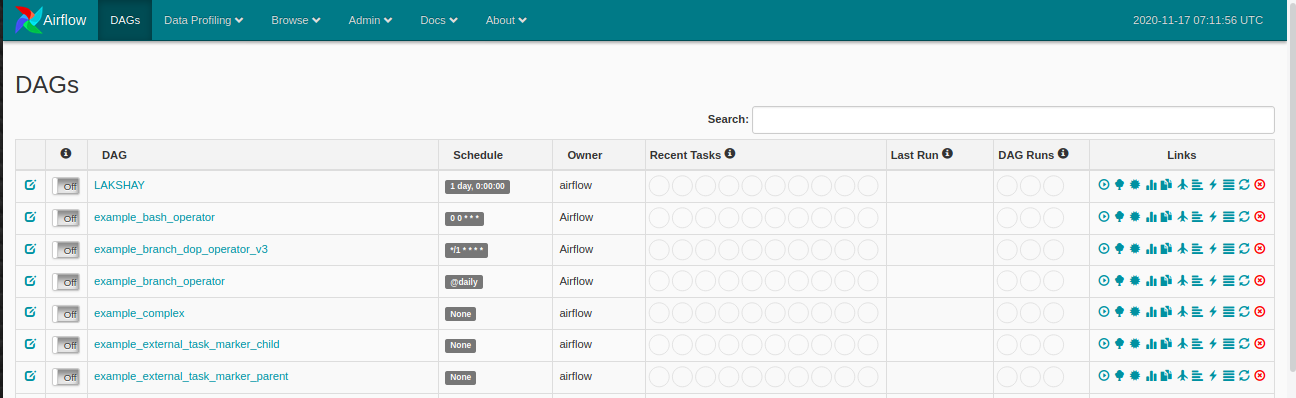
Now, make sure you have a folder name dags in the airflow directory where you will define your DAGS and open the web browser and go to open: http: // localhost: 8080 / admin / and you will see something like this:
Python operator in Apache Airflow
An operator describes a single task in the workflow and the operators provide us with, different operators, for many different tasks, for instance BashOperator, PythonOperator, Email operator, MySqlOperator, etc. In the last article, we learned how to use the BashOperator to get live cricket scores and on this, we will see how to use the PythonOperator.
Let's take a look at the following example:
-
Import the libraries
Let's start by importing the libraries we need. We will use the PythonOperator this time.
-
Defining DAG Arguments
For each of the DAGs, we need to pass a dictionary of arguments. Here is the description of some of the arguments you can pass:
- owner: The name of the workflow owner must be alphanumeric and can have underscores, but must not contain spaces.
- depends_on_past: If every time you run your workflow, data depends on previous run, mark it as true; on the contrary, mark it as False.
- start date: Start date of your workflow
- Email: Your email ID, so you can receive an email whenever any task fails for any reason.
- retry_delay: If any task fails, so how long should you wait to retry.
-
Python function definition
Now, We will define the Python function that will print a string using an argument and this function will then be used by PythonOperator.
-
Definition of DAG
Now, we will create a DAG object and pass the dag_id which is the name of the DAG and make sure you have not created any DAG with this name before. Pass the arguments we defined above and add a description and time_interval which will run the DAG after the specified time interval
-
Task definition
We only have one task for our workflow:
- Print: In the homework, we will print “Apache Airflow is a must-have for data engineers” in the terminal using the python function.
We will pass the task_id al PythonOperator object. You will see this name in the nodes of the Graph View of your DAG. Pass the Python function name to the argument “Python_callable” you want to run and the arguments you use for the parameter “op_kwargs” as a dictionary and, Finally, the DAG object to which you want to link this task.
-
Run the DAG
Now, cuando actualice su panelA panel is a group of experts that meets to discuss and analyze a specific topic. These forums are common at conferences, seminars and public debates, where participants share their knowledge and perspectives. Panels can address a variety of areas, from science to politics, and its objective is to encourage the exchange of ideas and critical reflection among the attendees.... de Airflow, you will see your new DAG listed.
Click on the DAG and open the graph view and you will see something like this. Each of the workflow steps will be in a separate box. In this workflow, We only have one step which is to print. Run the workflow and wait until its border turns dark green, indicating that it completed successfully.
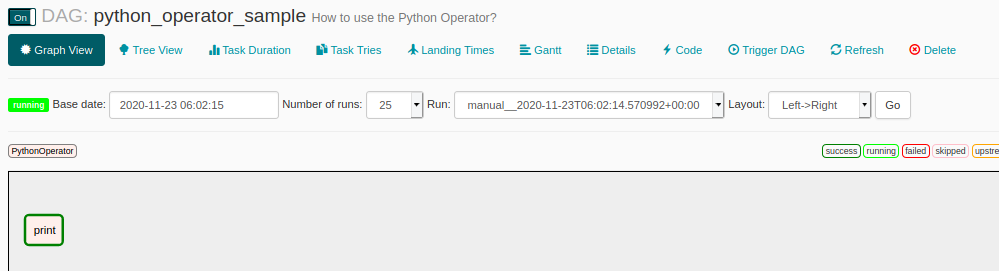
Click on the nodeNodo is a digital platform that facilitates the connection between professionals and companies in search of talent. Through an intuitive system, allows users to create profiles, share experiences and access job opportunities. Its focus on collaboration and networking makes Nodo a valuable tool for those who want to expand their professional network and find projects that align with their skills and goals.... “to print” for more details on this step and then click on Logs and you will see the result like this.

What are the variables in Apache Airflow?
We know that Airflow can be used to create and manage complex workflows. We can run multiple workflows at the same time. Existe la posibilidad de que la mayoría de sus flujos de trabajo estén usando la misma databaseA database is an organized set of information that allows you to store, Manage and retrieve data efficiently. Used in various applications, from enterprise systems to online platforms, Databases can be relational or non-relational. Proper design is critical to optimizing performance and ensuring information integrity, thus facilitating informed decision-making in different contexts.... o la misma ruta de archivo. Now, if you make any changes such as changing the path of the directory where to use the save files or changing the configuration of the databases. Then, you don't want to update each of the DAGS separately.
Airflow provides a solution for this, you can create variables where you can store and retrieve data at runtime in the multiple DAGS. Then, if any major changes occur, puede editar su variableIn statistics and mathematics, a "variable" is a symbol that represents a value that can change or vary. There are different types of variables, and qualitative, that describe non-numerical characteristics, and quantitative, representing numerical quantities. Variables are fundamental in experiments and studies, since they allow the analysis of relationships and patterns between different elements, facilitating the understanding of complex phenomena.... y sus flujos de trabajo están listos para comenzar.
How to create variables?
Open the Airflow panel and click on the Management in the top menu and then click Variables.
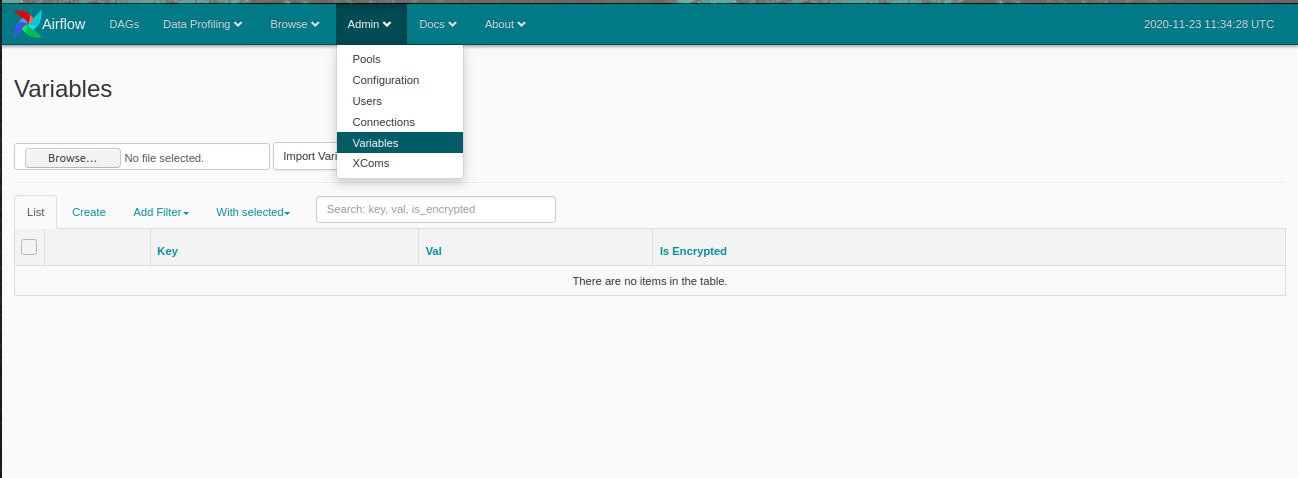
Now, click on To create to create a new variable and a window like this will open. Add key and value and submit. Here, I am creating a variable with the key name like Data path and value as the path of any random text file.
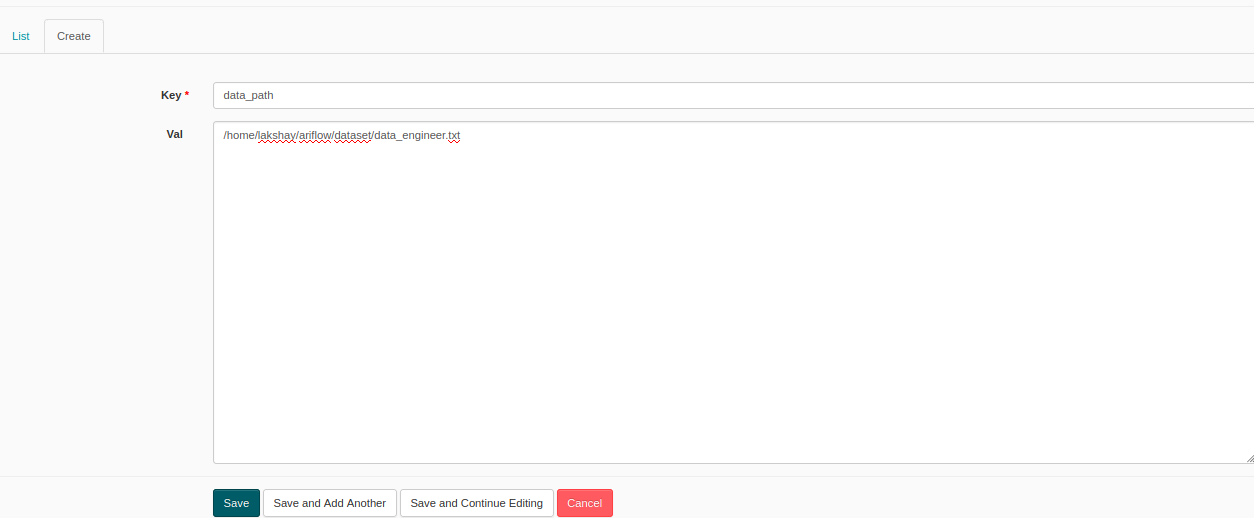
Now, we will create a DAG where we will find the word count of the text data present in this file. When you want to use variables, you must import them. Let's see how to do this:
Later, we will define the function that the variable path will use, read it and calculate the word count.
The rest of the steps are the same as we did previously, you need to define the DAG and tasks and your workflow is ready to run.
You can see the results in the log and now if you can use this variable in any other DAG and you can also edit it whenever you want and all your DAGS are updated.

Final notes
In this article, we understood how to use Python operator in Apache Airflow, concepts like branching and variables, and how to create them. In the next article, we will create a machine learning project and automate your workflow using Apache Airflow.
I recommend that you consult the following data engineering resources to improve your knowledge:
If you have any questions related to this article, let me know in the comment section below.





